What Is DHCP
DHCP stands for Dynamic Host Configuration Protocol. It is a way to automatically give an IP address and related configuration details to an end device such as a laptop or smartphone.
Why Is DHCP Used
DHCP is used to ease the burden of administering IP addressing for end devices.
Imagine a world where every time you move between networks, from home, to work, to public WiFi, you have to reconfigure your computer or phone to make it work.
You have to get details for:
- What IP address to use
- What the subnet mask should be
- What default gateway to use
- What DNS or Nameservers should you use
Someone has to keep a record of what addresses are in use, so they know which ones are available. This has to be updated every time someone joins or leaves the network.
DHCP takes care of all that. You can move freely between networks without having to re-configure your devices.
It allows administrators to renumber a network easily from a central location, or update details like which DNS server should be used.
DHCP also allows for efficient IP address usage. Clients are only given an address when they are connected to the network.
How Does DHCP Work – The Simple Answer
When a client joins a network it will request an address. One or more DHCP servers will offer one. The client will choose one of these offers and send a request to use it. This request will then be acknowledged by the server. Only after this acknowledgment can the client use the address.
The address comes with a ‘lease time’. The client will try to renew the address to extend the lease. This happens about halfway through the lease lifetime.
When the client leaves the network, it may tell the DHCP server that it is releasing the address it was using. The server can then re-allocate this address to another device.
How Does DHCP Work – The Long Answer
To understand the longer answer we need to define a few things first, such as the components used in a DHCP environment and the messages that get sent between the client and server.
DHCP Components
There are three main components to DHCP.
- DHCP Servers
- DHCP Clients
- DHCP Relay Servers.
The DHCP Servers are configured with a DHCP Scope for each network they are responsible for.
Each scope will include details like:
- IP Subnet and subnet mask.
- A range of “usable” addresses
- DHCP reservations, if there are any
- DHCP Options such as the default gateway, DNS Servers, or other IP configuration details.
- Lifetime of the lease
The range of “usable” addresses is usually smaller than the subnet the scope is configured for. If the subnet was 192.168.20.0/24 for example, then the usable addresses might be 192.168.20.20 through to 192.168.20.200. These are the addresses that can be dynamically allocated to clients. The other addresses are kept available for clients that might be statically configured or that have DHCP Reservations.
A DHCP reservation is simply a way of ensuring a particular client always gets the same IP Address. This is typically done by mapping an IP Address to the MAC Address of the client. This is useful when we don’t want to manually configure a device, but need its address to stay static so other devices can find it. Print servers for example.
The lifetime of the lease is important. In networks where the clients come and go slowly, such as an office, the lease time can be longer. Possibly a day or more. Where clients move more frequently, such as a coffee shop, the lease time should be shorter. Possibly 15 minutes.
The shorter the lease time the more quickly a server can recover addresses. A longer lease time means if the DHCP Server is unavailable, the existing leases remain valid for longer and the network is less likely to be adversely impacted.
In enterprise networks, DHCP servers are often centralized in data centers and managed by the IT department.
In the home or small office networks, DHCP services are usually pre-configured on the modem/router/Internet gateway provided by your ISP.
DHCP Clients are the end network devices that request configuration information.
DHCP Relay servers are network devices, typically a router or switch, that have been configured to relay DHCP messages from the local network to a specified set of DHCP servers. This means we don’t need a DHCP server on every network segment.
DHCP Message Types
There are 8 DHCP message types. Most of the time we focus on the first four which are associated with a client obtaining its IP address configuration.
DHCP DISCOVER – A broadcast from a client looking for configuration (DHCP) servers.
DHCP OFFER – Unicast from server to client offering configuration details
DHCP REQUEST – Broadcast from the client requesting offered configuration details
DHCP ACK – Unicast from server to client an acknowledgment of DHCPREQUEST
DHCP NAK – Server to client indicating client has wrong details.
DHCP DECLINE – From client to server to say the address is already in use
DHCP RELEASE – Unicast from the client to the server releasing the address
DHCP INFORM – Client to server, the client already has an address and is looking for additional configuration details.
Examples of the DHCP Process
The following examples are based on this lab diagram. Linux-1 is a DHCP client, Linux-2 is the DHCP server, and Linux-3 is a DHCP client on a remote subnet. VMX-3 is acting as a DHCP Relay.

Example 1 – DHCP Server On The Same Network As Client
In this example, we will explore how a client gets an IP Address when the DHCP server is on the same network as the client.
- The client sends a DHCPDISCOVER packet. As the client has no network configuration, this is sent as a broadcast packet so all other devices will see it
- The server sends a unicast DHCPOFFER to the client, offering an IP address and other configuration details. The client may receive offers from more than one DHCP server.
- The client chooses from the offers it receives and then broadcasts a DHCPREQUEST message. This message includes an option indicating the DHCP Server ID, which was learned in the OFFER message. This must be broadcast as the client is not yet allowed to use the details it has requested. Also, it allows other DHCP servers to see the request, and based on the DHCP Server ID know that their offer was not requested.
- The server whose offer was requested sends a unicast DHCP ACK to acknowledge the client can have the requested address details. Only after this can the client use the address.
You can see this played out in the packet capture shown below. A couple of things to note, the process isn’t just DHCP packets. After the initial DISCOVER message, the DHCP server tries to ping the address it is about to assign, to make sure it is not already in use. The client meanwhile re-sends a DISCOVER message which proceeds through the rest of the process.

You can also see the unicast replies from the DHCP server to the client have the destination address set to the address that it is offering.
The following images show more detail on the individual DHCP messages.
Discover: The main information supplied here is the client MAC address, its hostname, and what parameters it is requesting.

Offer: Here we see the offered address, and options for subnet mask, router (gateway) and lease time. The DHCP Server Identifier is also set.

Request: This is the client requesting the use of a specific IP address in option (50). The DHCP Server Identifier is also set.

And finally, the acknowledgment

Example 2 – DHCP Server On A Remote Network
From a client perspective, there is very little difference when a DHCP Relay is in use. The DHCPOFFER and DHCPACK packets have the source address of the DHCP Relay, but the DHCP Server Identifier is set to the DHCP Server.

On the DHCP Server side though, we can see several differences. The Relay unicasts the messages onwards to the DHCP server, the source IP Address is the LAN address of the Relay. Inside the DHCP message, the Relay Agent IP Address is set.

This is the relayed DISCOVER message. Notice how the Client MAC Address remains the same, that of Linux-3, and the Relay agent IP address is set.

Example 3 – Lease Renewal
A DHCP Client will attempt to renew its lease about halfway through the lease lifetime. In this example, the lease is 10 minutes, and so we see renewals happening at 300 seconds and 600 seconds.

We can see the initial Request and Ack at the top of the image. I missed the first Discover and Offer packets in this capture. Then after 300 seconds, we see another Request message, this one to renew the lease. This renewal Request is slightly different from the first one. Since the client has a valid IP address it can send this Request as a unicast message directly to the DHCP Server that provided the address. The acknowledgment is also unicast from server to client.
Example 4 – Lease Expiry
In this example, we are going to force a lease expiry. We are going to do this by shutting down the DHCP server after it has given a lease to Linux-1 and watching what happens.
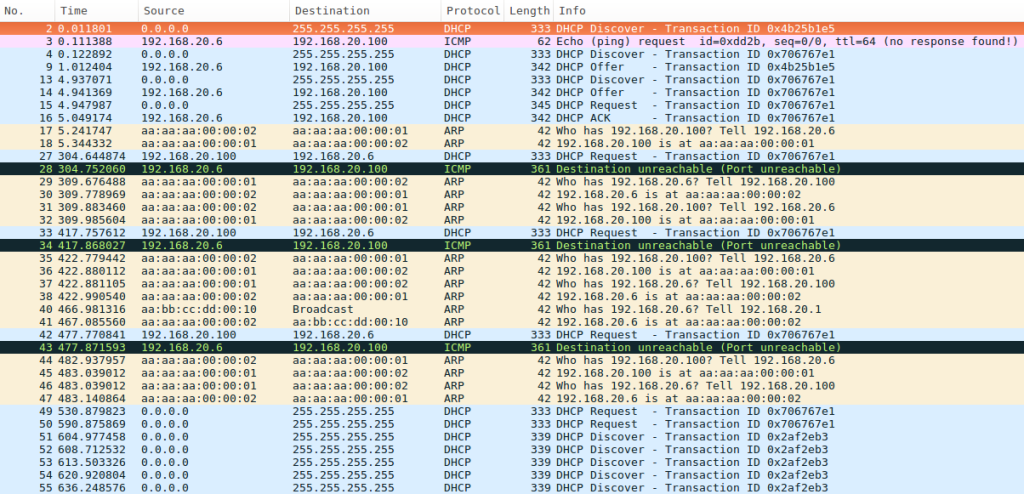
At the top of the capture, you can see the initial DHCP address allocation.
After about 300 seconds Linux-1 tries to renew the lease by sending a unicast DHCP Request to the DHCP Server. Since the DHCP Service on Linux-2 has been stopped an ICMP Port Unreachable is generated and sent back.
Linux-1 tries to renew again at 417 and 477 seconds, these are again unicast.
At 530 and 590 seconds Linux-1 makes final attempts to renew its lease, this time using broadcast packets to see if any available DHCP Server can renew the lease.
After 600 seconds the lease has expired and Linux-1 can no longer use the address it had. It restarts the DHCP process and begins broadcasting DHCP Discover messages.
Rogue DHCP servers
Rogue DHCP Servers are more often an issue in an office environment. These are simply a DHCP server that has been connected to the network by someone other than the IT department. This could be accidental or malicious.
These rogue servers cause a problem by handing out IP address information that is wrong for the local network. This may break network access for the client devices.
When done maliciously it may allow an attacker to redirect the client’s connections, or to try and snoop on their traffic. Remembering that DHCP passes out information on what DNS server and default gateway to use, someone may be able to perform a man-in-the-middle attack.
Whilst there is no authentication within the DHCP protocol itself, there are some measures you can take to protect against rogue DHCP Servers. This might include using 802.1x port security measures to prevent the rogue server from connecting to the network at all. Or using some form of DHCP Snooping, to prevent the operation of the rogue DHCP Server.
Further Reading
Now that you understand how DHCP works, you may like to read the following: