On Junos, we can limit the number of prefixes, or routes, that a BGP neighbor can advertise to us.
We can choose what to do when we receive too many routes. We can start logging messages or we can tear down the BGP session. Sessions can be torn down for a set amount of time or indefinitely until someone clears the BGP neighbor.
There is also the option to drop or hide the excess routes, instead of tearing down the session.
The prefix limits are set per address family and are configured at the BGP group or neighbor level.
Lab Environment
The lab is set up as per the below diagram.
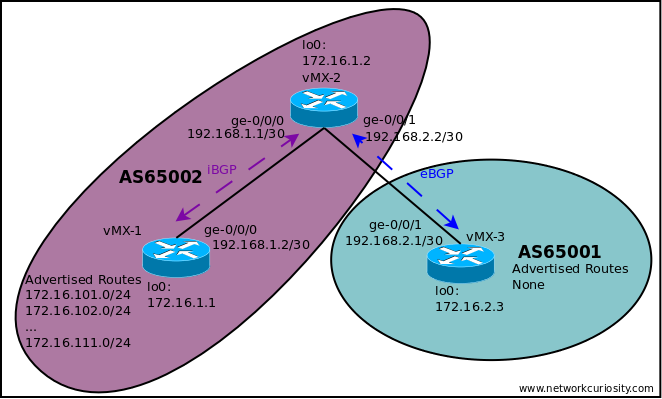
- vMX-1 and vMX-2 belong to AS 65002.
- vMX-3 belongs to AS 65001.
- iBGP is already configured between vMX-1 and vMX-2.
- eBGP is already configured between vMX-2 and vMX-3.
- vMX-1 is advertising 172.16.101.0/24 through to 172.16.104.0/24 to vMX-2.
- vMX-2 is on-advertising these routes to vMX-3.
- vMX-3 is not advertising any routes to vMX-2.
Lab Baseline
On vMX-3 we have four BGP routes being learned from vMX-2.
lab@vMX-3> show route protocol bgp

inet.0: 15 destinations, 15 routes (15 active, 0 holddown, 0 hidden)
+ = Active Route, - = Last Active, * = Both

172.16.101.0/24    *[BGP/170] 01:08:22, localpref 100
                      AS path: 65002 I, validation-state: unverified
                    >  to 192.168.2.2 via ge-0/0/1.0
172.16.102.0/24    *[BGP/170] 00:15:32, localpref 100
                      AS path: 65002 I, validation-state: unverified
                    >  to 192.168.2.2 via ge-0/0/1.0
172.16.103.0/24    *[BGP/170] 01:08:22, localpref 100
                      AS path: 65002 I, validation-state: unverified
                    >  to 192.168.2.2 via ge-0/0/1.0
172.16.104.0/24    *[BGP/170] 00:57:16, localpref 100
                      AS path: 65002 I, validation-state: unverified
                    >  to 192.168.2.2 via ge-0/0/1.0

inet6.0: 1 destinations, 1 routes (1 active, 0 holddown, 0 hidden)

lab@vMX-3>
As we work through the following examples, we will change various prefix limit settings on vMX-3 and see what happens when vMX-2 advertises more routes to vMX-3.
Example 1 – Configuring A Prefix Limit
We’ll start by just setting a prefix limit with no other options. Junos will log messages when this prefix limit is exceeded.
Note: In this example, I have moved down the configuration hierarchy using the edit command to make the rest of the configuration statements shorter.
[edit]
lab@vMX-3# show protocols bgp
group my-external-group {
    authentication-key "$9$35ou/AuRhr8X-O1X-VwaJ369"; ## SECRET-DATA
    peer-as 65002;
    neighbor 192.168.2.2;
}

[edit]
lab@vMX-3# edit protocols bgp group my-external-group

[edit protocols bgp group my-external-group]
lab@vMX-3# set family inet unicast prefix-limit maximum 10

[edit protocols bgp group my-external-group]
lab@vMX-3# top

[edit]
lab@vMX-3# show protocols bgp
group my-external-group {
    family inet {
        unicast {
            prefix-limit {
                maximum 10;
            }
        }
    }
    authentication-key "$9$35ou/AuRhr8X-O1X-VwaJ369"; ## SECRET-DATA
    peer-as 65002;
    neighbor 192.168.2.2;
}

[edit]
lab@vMX-3# commit
commit complete

[edit]
lab@vMX-3#
Example 1 – Validation With Eight Routes
With eight routes being received, everything still looks as we would expect. We see the following routes on vMX-3, and no messages in the log file.
Note: We’re using the terse form of the command to reduce the output.
lab@vMX-3> show route protocol bgp terse

inet.0: 19 destinations, 19 routes (19 active, 0 holddown, 0 hidden)
+ = Active Route, - = Last Active, * = Both

A V Destination        P Prf   Metric 1   Metric 2  Next hop        AS path
* ? 172.16.101.0/24    B 170        100                             65002 I
  unverified                                       >192.168.2.2
* ? 172.16.102.0/24    B 170        100                             65002 I
  unverified                                       >192.168.2.2
* ? 172.16.103.0/24    B 170        100                             65002 I
  unverified                                       >192.168.2.2
* ? 172.16.104.0/24    B 170        100                             65002 I
  unverified                                       >192.168.2.2
* ? 172.16.105.0/24    B 170        100                             65002 I
  unverified                                       >192.168.2.2
* ? 172.16.106.0/24    B 170        100                             65002 I
  unverified                                       >192.168.2.2
* ? 172.16.107.0/24    B 170        100                             65002 I
  unverified                                       >192.168.2.2
* ? 172.16.108.0/24    B 170        100                             65002 I
  unverified                                       >192.168.2.2

inet6.0: 1 destinations, 1 routes (1 active, 0 holddown, 0 hidden)

lab@vMX-3>
Example 1 – Validation With Ten Routes
The behavior at this stage is still the same. We now have ten routes on vMX-3, and nothing in the logs yet.
lab@vMX-3> show route protocol bgp terse

inet.0: 21 destinations, 21 routes (21 active, 0 holddown, 0 hidden)
+ = Active Route, - = Last Active, * = Both

A V Destination        P Prf   Metric 1   Metric 2  Next hop        AS path
* ? 172.16.101.0/24    B 170        100                             65002 I
  unverified                                       >192.168.2.2
* ? 172.16.102.0/24    B 170        100                             65002 I
  unverified                                       >192.168.2.2
...
<<output removed for brevity>>
...
* ? 172.16.108.0/24    B 170        100                             65002 I
  unverified                                       >192.168.2.2
* ? 172.16.109.0/24    B 170        100                             65002 I
  unverified                                       >192.168.2.2
* ? 172.16.110.0/24    B 170        100                             65002 I
  unverified                                       >192.168.2.2

inet6.0: 1 destinations, 1 routes (1 active, 0 holddown, 0 hidden)

lab@vMX-3>
Example 1 – Validation With Eleven Routes
Once we advertise eleven routes, we see a slight change. Because we have only set the limit and not told it to take any further action we still see all the routes, but we now get a message logged.
lab@vMX-3> show route protocol bgp terse

inet.0: 22 destinations, 22 routes (22 active, 0 holddown, 0 hidden)
+ = Active Route, - = Last Active, * = Both

A V Destination        P Prf   Metric 1   Metric 2  Next hop        AS path
* ? 172.16.101.0/24    B 170        100                             65002 I
  unverified                                       >192.168.2.2
* ? 172.16.102.0/24    B 170        100                             65002 I
  unverified                                       >192.168.2.2
...
<<output removed for brevity>>
...
* ? 172.16.110.0/24    B 170        100                             65002 I
  unverified                                       >192.168.2.2
* ? 172.16.111.0/24    B 170        100                             65002 I
  unverified                                       >192.168.2.2

inet6.0: 1 destinations, 1 routes (1 active, 0 holddown, 0 hidden)

lab@vMX-3>
lab@vMX-3> show log messages | last 5
Sep 22 00:02:50  vMX-3 mgd[9017]: UI_COMMIT_COMPLETED:  : commit complete
Sep 22 00:04:33  vMX-3 mgd[9017]: UI_DBASE_LOGOUT_EVENT: User 'lab' exiting configuration mode
Sep 22 00:11:36  vMX-3 rpd[8810]: BGP_PREFIX_LIMIT_EXCEEDED: 192.168.2.2 (External AS 65002): Configured maximum prefix-limit(10) exceeded for inet-unicast nlri: 11 (instance master)
Sep 22 00:12:06  vMX-3 rpd[8810]: BGP_PREFIX_LIMIT_EXCEEDED: 192.168.2.2 (External AS 65002): Configured maximum prefix-limit(10) exceeded for inet-unicast nlri: 11 (instance master)

lab@vMX-3>
Example 2 – Configuring A Prefix Limit With Teardown
Alerting us to the limit being exceeded is nice, but it doesn’t provide much protection. Instead, we can set it to tear down the BGP session. The configuration in this example will start logging messages at 80 percent of the limit and then tear down the BGP session when the limit is breached.
[edit]
lab@vMX-3# edit protocols bgp group my-external-group

[edit protocols bgp group my-external-group]
lab@vMX-3# set family inet unicast prefix-limit teardown 80

[edit protocols bgp group my-external-group]
lab@vMX-3# top

[edit]
lab@vMX-3# show protocols bgp
group my-external-group {
    family inet {
        unicast {
            prefix-limit {
                maximum 10;
                teardown 80;
            }
        }
    }
    authentication-key "$9$35ou/AuRhr8X-O1X-VwaJ369"; ## SECRET-DATA
    peer-as 65002;
    neighbor 192.168.2.2;
}

[edit]
lab@vMX-3# commit
commit complete

[edit]
lab@vMX-3#
Example 2 – Validation With Eight Routes
After resetting things, vMX-2 was advertising four routes to vMX-3. After increasing it to eight routes the following is seen.
vMX-3
lab@vMX-3> show route protocol bgp terse

inet.0: 19 destinations, 19 routes (19 active, 0 holddown, 0 hidden)
+ = Active Route, - = Last Active, * = Both

A V Destination        P Prf   Metric 1   Metric 2  Next hop        AS path
* ? 172.16.101.0/24    B 170        100                             65002 I
  unverified                                       >192.168.2.2
* ? 172.16.102.0/24    B 170        100                             65002 I
  unverified                                       >192.168.2.2
..
<<output removed for brevity>>
...
* ? 172.16.108.0/24    B 170        100                             65002 I
  unverified                                       >192.168.2.2

inet6.0: 1 destinations, 1 routes (1 active, 0 holddown, 0 hidden)

lab@vMX-3>
The vMX-3 router is now learning eight routes. Although we set the logging threshold to 80 percent we are not seeing any log messages yet. This is because the threshold needs to be exceeded, and 8 out of 10 routes is exactly 80 percent.
Example 2 – Validation With Ten Routes
When advertising ten routes we start to see some log messages.
lab@vMX-3> show route protocol bgp terse

inet.0: 21 destinations, 21 routes (21 active, 0 holddown, 0 hidden)
+ = Active Route, - = Last Active, * = Both

A V Destination        P Prf   Metric 1   Metric 2  Next hop        AS path
* ? 172.16.101.0/24    B 170        100                             65002 I
  unverified                                       >192.168.2.2
* ? 172.16.102.0/24    B 170        100                             65002 I
  unverified                                       >192.168.2.2
...
<<output removed for brevity>>
...
* ? 172.16.110.0/24    B 170        100                             65002 I
  unverified                                       >192.168.2.2

inet6.0: 1 destinations, 1 routes (1 active, 0 holddown, 0 hidden)

lab@vMX-3> show log messages | last 5
Sep 22 01:54:37  vMX-3 mgd[9017]: UI_COMMIT_COMPLETED:  : commit complete
Sep 22 01:56:47  vMX-3 mgd[9017]: UI_DBASE_LOGOUT_EVENT: User 'lab' exiting configuration mode
Sep 22 02:01:56  vMX-3 rpd[8810]: BGP_PREFIX_THRESH_EXCEEDED: 192.168.2.2 (External AS 65002): Configured maximum prefix-limit threshold(8) exceeded for inet-unicast nlri: 9 (instance master)
Sep 22 02:02:26  vMX-3 rpd[8810]: BGP_PREFIX_THRESH_EXCEEDED: 192.168.2.2 (External AS 65002): Configured maximum prefix-limit threshold(8) exceeded for inet-unicast nlri: 10 (instance master)

lab@vMX-3>
Interestingly, the output is slightly misleading. The log messages indicate that the threshold is 8, this seems to be a reference to the logging threshold as we know the prefix limit is set to 10.
Example 2 – Validation With Eleven Routes
What happens when we advertise eleven routes?
vMX-3
lab@vMX-3> show route protocol bgp terse

inet.0: 11 destinations, 11 routes (11 active, 0 holddown, 0 hidden)

inet6.0: 1 destinations, 1 routes (1 active, 0 holddown, 0 hidden)

lab@vMX-3> show log messages | last 5
Sep 22 02:06:20  vMX-3 rpd[8810]: bgp_pp_recv:5258: NOTIFICATION sent to 192.168.2.2+57428 (proto): code 6 (Cease) subcode 7 (Connection Collision Resolution), Reason: dropping 192.168.2.2+57428 (proto), connection collision prefers 192.168.2.2 (External AS 65002)
Sep 22 02:06:20  vMX-3 rpd[8810]: BGP_CEASE_PREFIX_LIMIT_EXCEEDED: 192.168.2.2 (External AS 65002): Shutting down peer due to exceeding configured maximum prefix-limit(10) for inet-unicast nlri: 11 (instance master)
Sep 22 02:06:20  vMX-3 rpd[8810]: bgp_rt_maxprefixes_check_common:9426: NOTIFICATION sent to 192.168.2.2 (External AS 65002): code 6 (Cease) subcode 9 (Hard Reset) [code 6 (Cease) subcode 1 (Maximum Number of Prefixes Reached)] AFI: 1 SAFI: 1 prefix limit 10

lab@vMX-3>
We no longer see any BGP routes. In this example, this is because vMX-3 is only receiving BGP routes from vMX-2, so when the session was torn down, we no longer had any BGP routes.
The log messages also clearly show the prefix limit is being exceeded and the BGP session is being shut down.
On vMX-2 we see similar log messages showing it received a notification about the maximum number of prefixes reached.
Note: The connection collision is due to both routers trying to re-establish the BGP session at the same time, and is not due to the prefix limit.
lab@vMX-2> show log messages | last 20
Sep 22 02:07:34  vMX-2 rpd[8785]: bgp_pp_recv:5270: NOTIFICATION sent to 192.168.2.1 (External AS 65001): code 6 (Cease) subcode 7 (Connection Collision Resolution), Reason: dropping 192.168.2.1 (External AS 65001), connection collision prefers 192.168.2.1+50830 (proto)
Sep 22 02:07:34  vMX-2 rpd[8785]: bgp_handle_notify:4541: NOTIFICATION received from 192.168.2.1 (External AS 65001): code 6 (Cease) subcode 9 (Hard Reset) [code 6 (Cease) subcode 1 (Maximum Number of Prefixes Reached)] AFI: 1 SAFI: 1 prefix limit 10
Sep 22 02:07:36  vMX-2 rpd[8785]: bgp_pp_recv:5270: NOTIFICATION sent to 192.168.2.1 (External AS 65001): code 6 (Cease) subcode 7 (Connection Collision Resolution), Reason: dropping 192.168.2.1 (External AS 65001), connection collision prefers 192.168.2.1+58086 (proto)
Sep 22 02:07:37  vMX-2 rpd[8785]: bgp_handle_notify:4541: NOTIFICATION received from 192.168.2.1 (External AS 65001): code 6 (Cease) subcode 9 (Hard Reset) [code 6 (Cease) subcode 1 (Maximum Number of Prefixes Reached)] AFI: 1 SAFI: 1 prefix limit 10
Sep 22 02:07:39  vMX-2 rpd[8785]: bgp_pp_recv:5270: NOTIFICATION sent to 192.168.2.1 (External AS 65001): code 6 (Cease) subcode 7 (Connection Collision Resolution), Reason: dropping 192.168.2.1 (External AS 65001), connection collision prefers 192.168.2.1+63205 (proto)
Sep 22 02:07:40  vMX-2 rpd[8785]: bgp_handle_notify:4541: NOTIFICATION received from 192.168.2.1 (External AS 65001): code 6 (Cease) subcode 9 (Hard Reset) [code 6 (Cease) subcode 1 (Maximum Number of Prefixes Reached)] AFI: 1 SAFI: 1 prefix limit 10
Sep 22 02:07:42  vMX-2 rpd[8785]: bgp_pp_recv:5270: NOTIFICATION sent to 192.168.2.1 (External AS 65001): code 6 (Cease) subcode 7 (Connection Collision Resolution), Reason: dropping 192.168.2.1 (External AS 65001), connection collision prefers 192.168.2.1+52402 (proto)

lab@vMX-2>
From the log messages you can see that in this state the BGP peering is flapping up and down. The session re-establishes, vMX-2 advertises more routes than vMX-3 allows, and vMX-3 tears the session down again.
This flapping is a waste of resources, especially on the vMX-3 side. Instead, we might prefer the neighbor to stay down for a while.
Example 3 – Configuring A Prefix Limit With An Idle Timeout of Forever
To stop the BGP neighbor from flapping we can configure an idle timeout value. In this example, we will set it to forever.
[edit]
lab@vMX-3# show protocols bgp
group my-external-group {
    family inet {
        unicast {
            prefix-limit {
                maximum 10;
                teardown {
                    80;
                    idle-timeout forever;
                }
            }
        }
    }
    authentication-key "$9$35ou/AuRhr8X-O1X-VwaJ369"; ## SECRET-DATA
    peer-as 65002;
    neighbor 192.168.2.2;
}

[edit]
lab@vMX-3# commit
commit complete

[edit]
lab@vMX-3#
Example 3 – Validation With Eleven Routes
Since we know the basic behavior from previous examples, we’ll jump ahead to advertising eleven routes.
On the vMX-3 router, we see the following.
lab@vMX-3> show route protocol bgp terse

inet.0: 11 destinations, 11 routes (11 active, 0 holddown, 0 hidden)

inet6.0: 1 destinations, 1 routes (1 active, 0 holddown, 0 hidden)

lab@vMX-3> show log messages | last 30
<<output removed for brevity>>
Sep 22 02:20:40  vMX-3 rpd[8810]: BGP_PREFIX_THRESH_EXCEEDED: 192.168.2.2 (External AS 65002): Configured maximum prefix-limit threshold(8) exceeded for inet-unicast nlri: 9 (instance master)
Sep 22 02:20:40  vMX-3 rpd[8810]: BGP_CEASE_PREFIX_LIMIT_EXCEEDED: 192.168.2.2 (External AS 65002): Shutting down peer due to exceeding configured maximum prefix-limit(10) for inet-unicast nlri: 11 (instance master)
Sep 22 02:20:40  vMX-3 rpd[8810]: bgp_rt_maxprefixes_check_common:9426: NOTIFICATION sent to 192.168.2.2 (External AS 65002): code 6 (Cease) subcode 9 (Hard Reset) [code 6 (Cease) subcode 1 (Maximum Number of Prefixes Reached)] AFI: 1 SAFI: 1 prefix limit 10
Sep 22 02:20:42  vMX-3 rpd[8810]: bgp_pp_recv:4991: NOTIFICATION sent to 192.168.2.2+59086 (proto): code 6 (Cease) subcode 1 (Maximum Number of Prefixes Reached), Reason: no group for 192.168.2.2+59086 (proto) from AS 65002 found (peer idled due to prefix-limit violation) in master(ge-0/0/1.0), dropping him
<<output removed for brevity>>

lab@vMX-3>
The last log message repeats as vMX-2 tries to re-establish the BGP session to vMX-3.
Let’s look at the BGP and neighbor summary.
lab@vMX-3> show bgp summary
Threading mode: BGP I/O
Default eBGP mode: advertise - accept, receive - accept
Groups: 1 Peers: 1 Down peers: 1
Table          Tot Paths  Act Paths Suppressed    History Damp State    Pending
inet.0
                       0          0          0          0          0          0
Peer                     AS      InPkt     OutPkt    OutQ   Flaps Last Up/Dwn State|#Active/Received/Accepted/Damped...
192.168.2.2           65002         32         30       0      43          57 Idle

lab@vMX-3> show bgp neighbor 192.168.2.2
Peer: 192.168.2.2 AS 65002     Local: 192.168.2.1 AS 65001
  Group: my-external-group     Routing-Instance: master
  Forwarding routing-instance: master
  Type: External    State: Idle           Flags: <PrefixLimitIdle>
  Last State: Established   Last Event: PrefixLimitExceeded
  Last Error: Cease
  Options: <Preference AuthKey AddressFamily PeerAS PrefixLimit Refresh>
  Options: <GracefulShutdownRcv>
  Authentication key is configured
  Address families configured: inet-unicast
  Holdtime: 90 Preference: 170
  Graceful Shutdown Receiver local-preference: 0
  Number of flaps: 43
  Last flap event: PrefixLimitExceeded
  Error: 'Cease' Sent: 43 Recv: 0

lab@vMX-3>
The summary information shows the session as Idle. This makes sense as vMX-3 is not currently accepting connections from this peer. The neighbor information is more helpful, with a flag and last event fields showing it relates to prefix limiting.
The vMX-2 router sees things a little bit differently though.
lab@vMX-2> show log messages | last 50
<<output removed for brevity>>
Sep 22 02:20:40  vMX-2 rpd[8785]: bgp_handle_notify:4541: NOTIFICATION received from 192.168.2.1 (External AS 65001): code 6 (Cease) subcode 9 (Hard Reset) [code 6 (Cease) subcode 1 (Maximum Number of Prefixes Reached)] AFI: 1 SAFI: 1 prefix limit 10
Sep 22 02:20:42  vMX-2 rpd[8785]: bgp_handle_notify:4541: NOTIFICATION received from 192.168.2.1 (External AS 65001): code 6 (Cease) subcode 1 (Maximum Number of Prefixes Reached)
Sep 22 02:21:04  vMX-2 last message repeated 5 times

lab@vMX-2>
The log messages show that we received a hard reset due to a maximum number of prefixes being reached. Further attempts to re-establish the BGP session result in a notification stopping BGP from establishing, again telling us the maximum number of prefixes was reached.
The output from the BGP neighbor and summary commands is not as helpful on vMX-2.
lab@vMX-2> show bgp summary
Threading mode: BGP I/O
Default eBGP mode: advertise - accept, receive - accept
Groups: 2 Peers: 2 Down peers: 1
Table          Tot Paths  Act Paths Suppressed    History Damp State    Pending
inet.0
                      11         11          0          0          0          0
Peer                     AS      InPkt     OutPkt    OutQ   Flaps Last Up/Dwn State|#Active/Received/Accepted/Damped...
172.16.1.1            65002        522        510       0       0     3:46:31 Establ
  inet.0: 11/11/11/0
192.168.2.1           65001          1          0       0      43        1:49 Active

lab@vMX-2> show bgp neighbor 192.168.2.1
Peer: 192.168.2.1 AS 65001     Local: 192.168.2.2 AS 65002
  Group: my-external-group     Routing-Instance: master
  Forwarding routing-instance: master
  Type: External    State: Active         Flags: <>
  Last State: Idle          Last Event: Start
  Last Error: Cease
  Options: <Preference AuthKey PeerAS Refresh>
  Options: <GracefulShutdownRcv>
  Authentication key is configured
  Holdtime: 90 Preference: 170
  Graceful Shutdown Receiver local-preference: 0
  Number of flaps: 43
  Last flap event: RecvNotify
  Error: 'Cease' Sent: 34 Recv: 55

lab@vMX-2>
The peer is in the active state, and the detailed neighbor information doesn’t offer many clues. As shown above, though, the log files clearly tell us why the BGP session can’t be established.
Example 3 – Clearing The Idle Timeout
After changing the route advertisements so that vMX-2 is only advertising four routes, the BGP session remains down.
We need to clear the neighbor on vMX-3.
lab@vMX-3> show bgp summary
Threading mode: BGP I/O
Default eBGP mode: advertise - accept, receive - accept
Groups: 1 Peers: 1 Down peers: 1
Table          Tot Paths  Act Paths Suppressed    History Damp State    Pending
inet.0
                       0          0          0          0          0          0
Peer                     AS      InPkt     OutPkt    OutQ   Flaps Last Up/Dwn State|#Active/Received/Accepted/Damped...
192.168.2.2           65002         32         30       0      43       25:38 Idle

lab@vMX-3> clear bgp neighbor 192.168.2.2
Cleared 1 connections

lab@vMX-3> show bgp summary
Threading mode: BGP I/O
Default eBGP mode: advertise - accept, receive - accept
Groups: 1 Peers: 1 Down peers: 0
Table          Tot Paths  Act Paths Suppressed    History Damp State    Pending
inet.0
                       4          4          0          0          0          0
Peer                     AS      InPkt     OutPkt    OutQ   Flaps Last Up/Dwn State|#Active/Received/Accepted/Damped...
192.168.2.2           65002          3          2       0      43           7 Establ
  inet.0: 4/4/4/0

lab@vMX-3>
If we had set the idle timeout to a particular value instead of forever, this would eventually have cleared on its own.
Example 4 – Configuring A Prefix Limit And Dropping Excess Routes
Instead of tearing the session down, Junos allows you to drop the excess routes.
For the next couple of examples, I had to change the lab and replace the vMX-3 router. It was running an older version of Junos. The ability to drop or hide excess routes with prefix limits is available from about Junos 21.3 or 21.4 onwards.
I replaced vMX-3 with a vJunos Router that was configured mostly the same. It connects to port ge-0/0/3 on vMX-2.
Now, let’s continue configuring a prefix limit to drop excess routes. Note that teardown, dropping routes, and hiding routes are all mutually exclusive. You can only configure one of these three options at a time.
[edit]
lab@vMX-3-B# edit protocols bgp group my-external-group

[edit protocols bgp group my-external-group]
lab@vMX-3-B# set family inet unicast prefix-limit drop-excess 80

[edit protocols bgp group my-external-group]
lab@vMX-3-B# top

[edit]
lab@vMX-3-B# show protocols bgp
group my-external-group {
    family inet {
        unicast {
            prefix-limit {
                maximum 10;
                ##
                ## Warning: Can't be configured together with drop-excess
                ## Warning: Can't be configured together with drop-excess
                ##
                teardown {
                    80;
                    idle-timeout forever;
                }
                ##
                ## Warning: Can't be configured together with teardown
                ## Warning: Can't be configured together with teardown
                ##
                drop-excess 80;
            }
        }
    }
    authentication-key "$9$35ou/AuRhr8X-O1X-VwaJ369"; ## SECRET-DATA
    peer-as 65002;
    neighbor 192.168.2.2;
}

[edit]
lab@vMX-3-B# edit protocols bgp group my-external-group

[edit protocols bgp group my-external-group]
lab@vMX-3-B# delete family inet unicast prefix-limit teardown

[edit protocols bgp group my-external-group]
lab@vMX-3-B# top

[edit]
lab@vMX-3-B# show protocols bgp
group my-external-group {
    family inet {
        unicast {
            prefix-limit {
                maximum 10;
                drop-excess 80;
            }
        }
    }
    authentication-key "$9$35ou/AuRhr8X-O1X-VwaJ369"; ## SECRET-DATA
    peer-as 65002;
    neighbor 192.168.2.2;
}

[edit]
lab@vMX-3-B# commit
commit complete

[edit]
lab@vMX-3-B#
Example 4 – Validation With Ten Routes
When advertising ten routes, we see the following in the route table on vMX-3-B.
lab@vMX-3-B> show route protocol bgp terse

inet.0: 18 destinations, 18 routes (18 active, 0 holddown, 0 hidden)
+ = Active Route, - = Last Active, * = Both

A V Destination        P Prf   Metric 1   Metric 2  Next hop        AS path
* ? 172.16.101.0/24    B 170        100            >192.168.2.2     65002 I
* ? 172.16.102.0/24    B 170        100            >192.168.2.2     65002 I
* ? 172.16.103.0/24    B 170        100            >192.168.2.2     65002 I
* ? 172.16.104.0/24    B 170        100            >192.168.2.2     65002 I
* ? 172.16.105.0/24    B 170        100            >192.168.2.2     65002 I
* ? 172.16.106.0/24    B 170        100            >192.168.2.2     65002 I
* ? 172.16.107.0/24    B 170        100            >192.168.2.2     65002 I
* ? 172.16.108.0/24    B 170        100            >192.168.2.2     65002 I
* ? 172.16.109.0/24    B 170        100            >192.168.2.2     65002 I
* ? 172.16.110.0/24    B 170        100            >192.168.2.2     65002 I

inet6.0: 1 destinations, 1 routes (1 active, 0 holddown, 0 hidden)

lab@vMX-3-B>
Similar to the threshold for teardown, because we configured it to alert at 80 percent, we see log messages telling us we have exceeded the logging threshold.
lab@vMX-3-B> show log messages | last 20
...
<<output removed for brevity>>
...
Sep 22 04:40:15  vMX-3-B rpd[13511]: BGP_PREFIX_THRESH_EXCEEDED: 192.168.2.2 (External AS 65002): Configured maximum prefix-limit threshold(8) exceeded for inet-unicast nlri: 9 (instance master)
Sep 22 04:40:15  vMX-3-B rpd[13511]: RPD_RT_HWM_NOTICE: New FIB highwatermark for routes: 9 [2024-09-22 04:40:14]
Sep 22 04:40:20  vMX-3-B mgd[15398]: UI_DBASE_LOGOUT_EVENT: User 'lab' exiting configuration mode
Sep 22 04:40:45  vMX-3-B rpd[13511]: RPD_RT_HWM_NOTICE: New RIB highwatermark for unique destinations: 28 [2024-09-22 04:40:14]
Sep 22 04:40:45  vMX-3-B rpd[13511]: RPD_RT_HWM_NOTICE: New RIB highwatermark for routes: 29 [2024-09-22 04:40:14]
Sep 22 04:40:45  vMX-3-B rpd[13511]: BGP_PREFIX_THRESH_EXCEEDED: 192.168.2.2 (External AS 65002): Configured maximum prefix-limit threshold(8) exceeded for inet-unicast nlri: 10 (instance master)
Sep 22 04:40:45  vMX-3-B rpd[13511]: RPD_RT_HWM_NOTICE: New FIB highwatermark for routes: 14 [2024-09-22 04:40:14]
Sep 22 04:41:15  vMX-3-B rpd[13511]: BGP_PREFIX_THRESH_EXCEEDED: 192.168.2.2 (External AS 65002): Configured maximum prefix-limit threshold(8) exceeded for inet-unicast nlri: 10 (instance master)

lab@vMX-3-B>
Example 4 – Validation With Eleven Routes
What happens when we exceed the prefix limit? When vMX-2 sends eleven routes, we see the following.
lab@vMX-3-B> show route protocol bgp terse

inet.0: 18 destinations, 18 routes (18 active, 0 holddown, 0 hidden)
+ = Active Route, - = Last Active, * = Both

A V Destination        P Prf   Metric 1   Metric 2  Next hop        AS path
* ? 172.16.101.0/24    B 170        100            >192.168.2.2     65002 I
* ? 172.16.102.0/24    B 170        100            >192.168.2.2     65002 I
* ? 172.16.103.0/24    B 170        100            >192.168.2.2     65002 I
* ? 172.16.104.0/24    B 170        100            >192.168.2.2     65002 I
* ? 172.16.105.0/24    B 170        100            >192.168.2.2     65002 I
* ? 172.16.106.0/24    B 170        100            >192.168.2.2     65002 I
* ? 172.16.107.0/24    B 170        100            >192.168.2.2     65002 I
* ? 172.16.108.0/24    B 170        100            >192.168.2.2     65002 I
* ? 172.16.109.0/24    B 170        100            >192.168.2.2     65002 I
* ? 172.16.110.0/24    B 170        100            >192.168.2.2     65002 I

inet6.0: 1 destinations, 1 routes (1 active, 0 holddown, 0 hidden)

lab@vMX-3-B> show log messages | last 10
Sep 22 04:41:45  vMX-3-B rpd[13511]: BGP_PREFIX_THRESH_EXCEEDED: 192.168.2.2 (External AS 65002): Configured maximum prefix-limit threshold(8) exceeded for inet-unicast nlri: 10 (instance master)
Sep 22 04:43:45  vMX-3-B last message repeated 4 times
Sep 22 04:44:45  vMX-3-B last message repeated 2 times
Sep 22 04:45:15  vMX-3-B rpd[13511]: BGP_PREFIX_THRESH_EXCEEDED: 192.168.2.2 (External AS 65002): Configured maximum prefix-limit threshold(8) exceeded for inet-unicast nlri: 10 (instance master)
Sep 22 04:45:37  vMX-3-B rpd[13511]: BGP_DROP_PREFIX_LIMIT_EXCEEDED: 192.168.2.2 (External AS 65002): Dropping route for prefix 172.16.111.0/24 due to exceeding configured maximum prefix-limit (10) for inet-unicast nlri: 11 (instance master)
Sep 22 04:45:45  vMX-3-B rpd[13511]: BGP_PREFIX_THRESH_EXCEEDED: 192.168.2.2 (External AS 65002): Configured maximum prefix-limit threshold(8) exceeded for inet-unicast nlri: 10 (instance master)

lab@vMX-3-B>
vMX-3-B still only has 10 BGP routes visible from vMX-2. There is a new log message we haven’t seen before, telling us it is dropping a specific route.
From vMX-2’s perspective, everything looks normal. There is no indication that vMX-3-B has dropped the route.
What happens if we create a bit of churn in the routing table? A change is made so vMX-2 doesn’t advertise some of the routes.
vMX-2
lab@vMX-2> show route advertising-protocol bgp 192.168.2.1

inet.0: 21 destinations, 21 routes (21 active, 0 holddown, 0 hidden)
  Prefix		  Nexthop	       MED     Lclpref    AS path
* 172.16.101.0/24         Self                                    I
* 172.16.102.0/24         Self                                    I
* 172.16.107.0/24         Self                                    I
* 172.16.108.0/24         Self                                    I
* 172.16.109.0/24         Self                                    I
* 172.16.110.0/24         Self                                    I
* 172.16.111.0/24         Self                                    I

lab@vMX-2>
The routes now look like this on vMX-3-B.
lab@vMX-3-B> show route protocol bgp terse

inet.0: 14 destinations, 14 routes (14 active, 0 holddown, 0 hidden)
+ = Active Route, - = Last Active, * = Both

A V Destination        P Prf   Metric 1   Metric 2  Next hop        AS path
* ? 172.16.101.0/24    B 170        100            >192.168.2.2     65002 I
* ? 172.16.102.0/24    B 170        100            >192.168.2.2     65002 I
* ? 172.16.107.0/24    B 170        100            >192.168.2.2     65002 I
* ? 172.16.108.0/24    B 170        100            >192.168.2.2     65002 I
* ? 172.16.109.0/24    B 170        100            >192.168.2.2     65002 I
* ? 172.16.110.0/24    B 170        100            >192.168.2.2     65002 I

inet6.0: 1 destinations, 1 routes (1 active, 0 holddown, 0 hidden)

lab@vMX-3-B>
Notice how vMX-2 still thinks it has advertised the 172.16.111.0/24 route to vMX-3-B, but it isn’t in the latter’s routing table? Even though the number of routes has now dropped?
Remember that BGP will only advertise or withdraw a route once, it won’t periodically re-advertise the route. Once vMX-3-B has dropped the route that vMX-2 sent it, it won’t learn it again until something causes it to be resent.
We can do this by doing a soft reset on the BGP neighbor.
lab@vMX-3-B> clear bgp neighbor 192.168.2.2 soft-inbound

lab@vMX-3-B> show route protocol bgp terse

inet.0: 15 destinations, 15 routes (15 active, 0 holddown, 0 hidden)
+ = Active Route, - = Last Active, * = Both

A V Destination        P Prf   Metric 1   Metric 2  Next hop        AS path
* ? 172.16.101.0/24    B 170        100            >192.168.2.2     65002 I
* ? 172.16.102.0/24    B 170        100            >192.168.2.2     65002 I
* ? 172.16.107.0/24    B 170        100            >192.168.2.2     65002 I
* ? 172.16.108.0/24    B 170        100            >192.168.2.2     65002 I
* ? 172.16.109.0/24    B 170        100            >192.168.2.2     65002 I
* ? 172.16.110.0/24    B 170        100            >192.168.2.2     65002 I
* ? 172.16.111.0/24    B 170        100            >192.168.2.2     65002 I

inet6.0: 1 destinations, 1 routes (1 active, 0 holddown, 0 hidden)

lab@vMX-3-B>
What if we now re-advertise the routes we stopped advertising earlier?
lab@vMX-3-B> show route protocol bgp terse

inet.0: 18 destinations, 18 routes (18 active, 0 holddown, 0 hidden)
+ = Active Route, - = Last Active, * = Both

A V Destination        P Prf   Metric 1   Metric 2  Next hop        AS path
* ? 172.16.101.0/24    B 170        100            >192.168.2.2     65002 I
* ? 172.16.102.0/24    B 170        100            >192.168.2.2     65002 I
* ? 172.16.103.0/24    B 170        100            >192.168.2.2     65002 I
* ? 172.16.105.0/24    B 170        100            >192.168.2.2     65002 I
* ? 172.16.106.0/24    B 170        100            >192.168.2.2     65002 I
* ? 172.16.107.0/24    B 170        100            >192.168.2.2     65002 I
* ? 172.16.108.0/24    B 170        100            >192.168.2.2     65002 I
* ? 172.16.109.0/24    B 170        100            >192.168.2.2     65002 I
* ? 172.16.110.0/24    B 170        100            >192.168.2.2     65002 I
* ? 172.16.111.0/24    B 170        100            >192.168.2.2     65002 I

inet6.0: 1 destinations, 1 routes (1 active, 0 holddown, 0 hidden)

lab@vMX-3-B> show log messages | last 5
Sep 22 04:48:15  vMX-3-B last message repeated 4 times
Sep 22 04:54:15  vMX-3-B last message repeated 12 times
Sep 22 05:01:21  vMX-3-B rpd[13511]: BGP_PREFIX_THRESH_EXCEEDED: 192.168.2.2 (External AS 65002): Configured maximum prefix-limit threshold(8) exceeded for inet-unicast nlri: 9 (instance master)
Sep 22 05:01:21  vMX-3-B rpd[13511]: BGP_DROP_PREFIX_LIMIT_EXCEEDED: 192.168.2.2 (External AS 65002): Dropping route for prefix 172.16.104.0/24 due to exceeding configured maximum prefix-limit (10) for inet-unicast nlri: 11 (instance master)

lab@vMX-3-B>
Again, the prefix limit is hit, this time it causes the 172.16.104.0/24 route to be dropped.
Example 5 – Configuring A Prefix Limit And Hiding Excess Routes
After resetting the lab so that vMX-2 only advertises four routes to vMX-3, let’s change it to hide the excess routes instead of dropping them. We’ll still configure it to alert at the 80 percent mark.
[edit]
lab@vMX-3-B# edit protocols bgp group my-external-group

[edit protocols bgp group my-external-group]
lab@vMX-3-B# delete family inet unicast prefix-limit drop-excess

[edit protocols bgp group my-external-group]
lab@vMX-3-B# set family inet unicast prefix-limit hide-excess 80

[edit protocols bgp group my-external-group]
lab@vMX-3-B# top

[edit]
lab@vMX-3-B# show protocols bgp
group my-external-group {
    family inet {
        unicast {
            prefix-limit {
                maximum 10;
                hide-excess 80;
            }
        }
    }
    authentication-key "$9$35ou/AuRhr8X-O1X-VwaJ369"; ## SECRET-DATA
    peer-as 65002;
    neighbor 192.168.2.2;
}

[edit]
lab@vMX-3-B# commit
commit complete

[edit]
lab@vMX-3-B#
Example 5 – Validation With Ten Routes
When we advertise ten routes to vMX-3-B everything is mostly normal. We see all the routes but should get a log message because we are over 80 percent of the prefix limit.
lab@vMX-3-B> show route protocol bgp terse

inet.0: 18 destinations, 18 routes (18 active, 0 holddown, 0 hidden)
+ = Active Route, - = Last Active, * = Both

A V Destination        P Prf   Metric 1   Metric 2  Next hop        AS path
* ? 172.16.101.0/24    B 170        100            >192.168.2.2     65002 I
* ? 172.16.102.0/24    B 170        100            >192.168.2.2     65002 I
* ? 172.16.103.0/24    B 170        100            >192.168.2.2     65002 I
* ? 172.16.104.0/24    B 170        100            >192.168.2.2     65002 I
* ? 172.16.105.0/24    B 170        100            >192.168.2.2     65002 I
* ? 172.16.106.0/24    B 170        100            >192.168.2.2     65002 I
* ? 172.16.107.0/24    B 170        100            >192.168.2.2     65002 I
* ? 172.16.108.0/24    B 170        100            >192.168.2.2     65002 I
* ? 172.16.109.0/24    B 170        100            >192.168.2.2     65002 I
* ? 172.16.110.0/24    B 170        100            >192.168.2.2     65002 I

inet6.0: 1 destinations, 1 routes (1 active, 0 holddown, 0 hidden)

lab@vMX-3-B> show log messages | last 5
Sep 22 05:05:44  vMX-3-B mgd[15398]: UI_COMMIT_COMPLETED:  : commit complete
Sep 22 05:07:13  vMX-3-B mgd[15398]: UI_DBASE_LOGOUT_EVENT: User 'lab' exiting configuration mode
Sep 22 05:08:16  vMX-3-B rpd[13511]: BGP_PREFIX_THRESH_EXCEEDED: 192.168.2.2 (External AS 65002): Configured maximum prefix-limit threshold(8) exceeded for inet-unicast nlri: 9 (instance master)
Sep 22 05:08:46  vMX-3-B rpd[13511]: BGP_PREFIX_THRESH_EXCEEDED: 192.168.2.2 (External AS 65002): Configured maximum prefix-limit threshold(8) exceeded for inet-unicast nlri: 10 (instance master)

lab@vMX-3-B>
Example 5 – Validation With Eleven Routes
What happens when we advertise eleven routes?
lab@vMX-3-B> show route protocol bgp terse

inet.0: 19 destinations, 19 routes (18 active, 0 holddown, 1 hidden)
+ = Active Route, - = Last Active, * = Both

A V Destination        P Prf   Metric 1   Metric 2  Next hop        AS path
* ? 172.16.101.0/24    B 170        100            >192.168.2.2     65002 I
* ? 172.16.102.0/24    B 170        100            >192.168.2.2     65002 I
* ? 172.16.103.0/24    B 170        100            >192.168.2.2     65002 I
* ? 172.16.104.0/24    B 170        100            >192.168.2.2     65002 I
* ? 172.16.105.0/24    B 170        100            >192.168.2.2     65002 I
* ? 172.16.106.0/24    B 170        100            >192.168.2.2     65002 I
* ? 172.16.107.0/24    B 170        100            >192.168.2.2     65002 I
* ? 172.16.108.0/24    B 170        100            >192.168.2.2     65002 I
* ? 172.16.109.0/24    B 170        100            >192.168.2.2     65002 I
* ? 172.16.110.0/24    B 170        100            >192.168.2.2     65002 I

inet6.0: 1 destinations, 1 routes (1 active, 0 holddown, 0 hidden)

lab@vMX-3-B> show log messages | last 10
...
<<output removed for brevity>>
...
Sep 22 05:10:16  vMX-3-B last message repeated 2 times
Sep 22 05:10:17  vMX-3-B rpd[13511]: BGP_HIDE_PREFIX_LIMIT_EXCEEDED: 192.168.2.2 (External AS 65002): Hiding route for prefix 172.16.111.0/24 due to exceeding configured maximum prefix-limit (10) for inet-unicast nlri: 11 (instance master)
...
<<output removed for brevity>>
...

lab@vMX-3-B>
The behavior looks similar to dropping routes. This time, however, instead of being dropped, the route is being hidden.
We can look at the hidden routes and add the detail option to see why routes are hidden.
lab@vMX-3-B> show route hidden

inet.0: 19 destinations, 19 routes (18 active, 0 holddown, 1 hidden)
+ = Active Route, - = Last Active, * = Both

172.16.111.0/24     [BGP ] 00:04:21, localpref 100
                      AS path: 65002 I, validation-state: unverified
                    >  to 192.168.2.2 via ge-0/0/1.0

inet6.0: 1 destinations, 1 routes (1 active, 0 holddown, 0 hidden)

lab@vMX-3-B> show route hidden detail

inet.0: 19 destinations, 19 routes (18 active, 0 holddown, 1 hidden)
172.16.111.0/24 (1 entry, 0 announced)
         BGP                 /-101
                Next hop type: Router, Next hop index: 581
                Address: 0x77c6464
                Next-hop reference count: 21, Next-hop session id: 320
                Kernel Table Id: 0
                Source: 192.168.2.2
                Next hop: 192.168.2.2 via ge-0/0/1.0, selected
                Session Id: 320
                State: <Hidden Ext Changed>
                Local AS: 65001 Peer AS: 65002
                Age: 4:23
                Validation State: unverified
                Task: BGP_65002.192.168.2.2
                AS path: 65002 I
                Localpref: 100
                Router ID: 172.16.1.2
                Hidden reason: Hidden due to crossing prefix-limit
                Thread: junos-main

inet6.0: 1 destinations, 1 routes (1 active, 0 holddown, 0 hidden)

lab@vMX-3-B>
Once more, let’s churn some routes, vMX-2 is now advertising the following.
lab@vMX-2> show route advertising-protocol bgp 192.168.2.1

inet.0: 21 destinations, 21 routes (21 active, 0 holddown, 0 hidden)
  Prefix		  Nexthop	       MED     Lclpref    AS path
* 172.16.101.0/24         Self                                    I
* 172.16.102.0/24         Self                                    I
* 172.16.107.0/24         Self                                    I
* 172.16.108.0/24         Self                                    I
* 172.16.109.0/24         Self                                    I
* 172.16.110.0/24         Self                                    I
* 172.16.111.0/24         Self                                    I

lab@vMX-2>
On vMX-3-B, even though the number of routes has dropped below the prefix limit, the 172.16.111.0/24 is still hidden.
lab@vMX-3-B> show route protocol bgp terse

inet.0: 15 destinations, 15 routes (14 active, 0 holddown, 1 hidden)
+ = Active Route, - = Last Active, * = Both

A V Destination        P Prf   Metric 1   Metric 2  Next hop        AS path
* ? 172.16.101.0/24    B 170        100            >192.168.2.2     65002 I
* ? 172.16.102.0/24    B 170        100            >192.168.2.2     65002 I
* ? 172.16.107.0/24    B 170        100            >192.168.2.2     65002 I
* ? 172.16.108.0/24    B 170        100            >192.168.2.2     65002 I
* ? 172.16.109.0/24    B 170        100            >192.168.2.2     65002 I
* ? 172.16.110.0/24    B 170        100            >192.168.2.2     65002 I

inet6.0: 1 destinations, 1 routes (1 active, 0 holddown, 0 hidden)

lab@vMX-3-B> show route hidden

inet.0: 15 destinations, 15 routes (14 active, 0 holddown, 1 hidden)
+ = Active Route, - = Last Active, * = Both

172.16.111.0/24     [BGP ] 00:08:56, localpref 100
                      AS path: 65002 I, validation-state: unverified
                    >  to 192.168.2.2 via ge-0/0/1.0

inet6.0: 1 destinations, 1 routes (1 active, 0 holddown, 0 hidden)

lab@vMX-3-B>
We need to clear the BGP neighbor to make the hidden route visible.
lab@vMX-3-B> clear bgp neighbor 192.168.2.2 soft-inbound

lab@vMX-3-B> show route protocol bgp terse

inet.0: 15 destinations, 15 routes (15 active, 0 holddown, 0 hidden)
+ = Active Route, - = Last Active, * = Both

A V Destination        P Prf   Metric 1   Metric 2  Next hop        AS path
* ? 172.16.101.0/24    B 170        100            >192.168.2.2     65002 I
* ? 172.16.102.0/24    B 170        100            >192.168.2.2     65002 I
* ? 172.16.107.0/24    B 170        100            >192.168.2.2     65002 I
* ? 172.16.108.0/24    B 170        100            >192.168.2.2     65002 I
* ? 172.16.109.0/24    B 170        100            >192.168.2.2     65002 I
* ? 172.16.110.0/24    B 170        100            >192.168.2.2     65002 I
* ? 172.16.111.0/24    B 170        100            >192.168.2.2     65002 I

inet6.0: 1 destinations, 1 routes (1 active, 0 holddown, 0 hidden)

lab@vMX-3-B>
If we advertise the networks we stopped advertising, we again hit the limit, and a different route is hidden.
lab@vMX-3-B> show route protocol bgp terse

inet.0: 19 destinations, 19 routes (18 active, 0 holddown, 1 hidden)
+ = Active Route, - = Last Active, * = Both

A V Destination        P Prf   Metric 1   Metric 2  Next hop        AS path
* ? 172.16.101.0/24    B 170        100            >192.168.2.2     65002 I
* ? 172.16.102.0/24    B 170        100            >192.168.2.2     65002 I
* ? 172.16.103.0/24    B 170        100            >192.168.2.2     65002 I
* ? 172.16.105.0/24    B 170        100            >192.168.2.2     65002 I
* ? 172.16.106.0/24    B 170        100            >192.168.2.2     65002 I
* ? 172.16.107.0/24    B 170        100            >192.168.2.2     65002 I
* ? 172.16.108.0/24    B 170        100            >192.168.2.2     65002 I
* ? 172.16.109.0/24    B 170        100            >192.168.2.2     65002 I
* ? 172.16.110.0/24    B 170        100            >192.168.2.2     65002 I
* ? 172.16.111.0/24    B 170        100            >192.168.2.2     65002 I

inet6.0: 1 destinations, 1 routes (1 active, 0 holddown, 0 hidden)

lab@vMX-3-B> show route hidden

inet.0: 19 destinations, 19 routes (18 active, 0 holddown, 1 hidden)
+ = Active Route, - = Last Active, * = Both

172.16.104.0/24     [BGP ] 00:00:25, localpref 100
                      AS path: 65002 I, validation-state: unverified
                    >  to 192.168.2.2 via ge-0/0/1.0

inet6.0: 1 destinations, 1 routes (1 active, 0 holddown, 0 hidden)

lab@vMX-3-B> show log messages | last 5
Sep 22 05:10:17  vMX-3-B rpd[13511]: RPD_RT_HWM_NOTICE: New RIB highwatermark for unique destinations: 29 [2024-09-22 05:10:16]
Sep 22 05:10:17  vMX-3-B rpd[13511]: RPD_RT_HWM_NOTICE: New RIB highwatermark for routes: 30 [2024-09-22 05:10:16]
Sep 22 05:22:07  vMX-3-B rpd[13511]: BGP_PREFIX_THRESH_EXCEEDED: 192.168.2.2 (External AS 65002): Configured maximum prefix-limit threshold(8) exceeded for inet-unicast nlri: 9 (instance master)
Sep 22 05:22:07  vMX-3-B rpd[13511]: BGP_HIDE_PREFIX_LIMIT_EXCEEDED: 192.168.2.2 (External AS 65002): Hiding route for prefix 172.16.104.0/24 due to exceeding configured maximum prefix-limit (10) for inet-unicast nlri: 11 (instance master)

lab@vMX-3-B>
A reminder that BGP only advertises routes that have changed, not all of the routes. In this case, that means routes for 172.16.103.0/24, 172.16.104.0/24, 172.16.105.0/24, and 172.16.106.0/24 were advertised to vMX-3-B. Whichever one happened to be last received was hidden.
Summary
The above examples have shown how to configure prefix limits for BGP routes we learn from our neighbors.
We can log the event, teardown the session, or drop or hide the excess routes.
My preference, at this time, is to either log the event or tear the session down. Tearing the session down is obvious to both sides of the BGP session and will likely elicit some form of response.
Hiding or dropping routes is far less obvious to one side of the BGP session. They have advertised the routes to you, but by hiding or dropping them you have not advertised them onwards. This does have the benefit of potentially avoiding an outage, but it comes at the cost of increasing the difficulty for someone to troubleshoot why they are not receiving traffic for the new routes, but the older routes work fine.
Furthermore, what route(s) are impacted by dropping or hiding routes will change if there is enough churn in the routing table. Again this leads to ambiguity and confusion for someone trying to troubleshoot.
I think it comes down to what is the least surprising thing I can do to my BGP peer.
If you are new to BGP on Junos take a look at this basic BGP configuration example.