The authentication for OSPFv3 differs from OSPFv2.
OSPFv3 does not use the authentication types of simple or MD5. Instead, an IPSEC Security Association (SA) is created. This can use AH to authenticate the OSPFv3 traffic or ESP to encrypt it.
Lab Environment
This lab uses two vJunos Routers connected via ge-0/0/0.

- Interfaces are already configured.
- Basic OSPFv3 is already configured.
The relevant baseline configuration from R1 is shown below. R2 is configured similarly.
lab@vRouter-1> show configuration interfaces ge-0/0/0
description "vQFX-1 xe-0/0/6";
unit 0 {
    family inet6 {
        address 2001:db8:0102::1/64;
    }
}

lab@vRouter-1> show configuration interfaces lo0
unit 0 {
    family inet6 {
        address 2001:db8:1::1/128;
    }
}

lab@vRouter-1> show configuration routing-options
router-id 192.168.0.1;

lab@vRouter-1> show configuration protocols
ospf3 {
    area 0.0.0.0 {
        interface ge-0/0/0.0;
        interface lo0.0;
    }
    reference-bandwidth 100g;
}

lab@vRouter-1>
Since OSPFv3 is already configured, we can check the neighbors and routes. In this case, we should have a route to R2’s loopback address.
lab@vRouter-1> show ospf3 neighbor
ID               Interface              State     Pri   Dead
192.168.0.2      ge-0/0/0.0             Full      128     33
  Neighbor-address fe80::5200:ff:fe03:1

lab@vRouter-1> show route protocol ospf3

inet.0: 4 destinations, 4 routes (4 active, 0 holddown, 0 hidden)

inet6.0: 8 destinations, 8 routes (8 active, 0 holddown, 0 hidden)
+ = Active Route, - = Last Active, * = Both

2001:db8:1::2/128  *[OSPF3/10] 00:04:19, metric 100
                    >  to fe80::5200:ff:fe03:1 via ge-0/0/0.0
ff02::5/128        *[OSPF3/10] 00:08:48, metric 1
                       MultiRecv

lab@vRouter-1>
OSPFv3 Authentication Example
In this example, we will configure authentication between R1 and R2. We’ll create a manual security association so there is no need for IKE.
R1 Security Association
[edit]
lab@vRouter-1# set security ipsec security-association sa-for-ospfv3 mode transport

[edit]
lab@vRouter-1# set security ipsec security-association sa-for-ospfv3 manual direction bidirectional protocol ah

[edit]
lab@vRouter-1# set security ipsec security-association sa-for-ospfv3 manual direction bidirectional spi 256

[edit]
lab@vRouter-1# set security ipsec security-association sa-for-ospfv3 manual direction bidirectional authentication algorithm hmac-sha-256-128

[edit]
lab@vRouter-1# set security ipsec security-association sa-for-ospfv3 manual direction bidirectional authentication key ascii-text thismustbe32bytes890123456789012

[edit]
lab@vRouter-1# set protocols ospf3 area 0.0.0.0 interface ge-0/0/0.0 ipsec-sa sa-for-ospfv3

[edit]
lab@vRouter-1#
Note: The key needs to be 32 bytes, or characters, long. Otherwise, you will see the following error message when committing the configuration.
[edit]
lab@vRouter-1# commit
[edit security ipsec security-association sa-for-ospfv3 manual direction bidirectional authentication key ascii-text]
  'ascii-text "$9$W078-wZGik.5ZUz69AIRdbsYJDHkPF39.mO1EhKvjHq.QntpBESeREgoaJDj9At0RhrevXNdKvGDk.5TreKMNdVwY"'
    Authentication key size must be 32 bytes
error: configuration check-out failed

[edit]
lab@vRouter-1#
R2 Security Association
The configuration for R2 is the same as for R1.
lab@vRouter-2> edit
Entering configuration mode

[edit]
lab@vRouter-2# set security ipsec security-association sa-for-ospfv3 mode transport

[edit]
lab@vRouter-2# set security ipsec security-association sa-for-ospfv3 manual direction bidirectional protocol ah

[edit]
lab@vRouter-2# set security ipsec security-association sa-for-ospfv3 manual direction bidirectional spi 256

[edit]
lab@vRouter-2# set security ipsec security-association sa-for-ospfv3 manual direction bidirectional authentication algorithm hmac-sha-256-128

[edit]
lab@vRouter-2# set security ipsec security-association sa-for-ospfv3 manual direction bidirectional authentication key ascii-text thismustbe32bytes890123456789012

[edit]
lab@vRouter-2# set protocols ospf3 area 0.0.0.0 interface ge-0/0/0.0 ipsec-sa sa-for-ospfv3

[edit]
lab@vRouter-2# commit
commit complete

[edit]
lab@vRouter-2#
Verification
We can now verify the security association and that OSPFv3 is up.
lab@vRouter-1> show ipsec security-associations detail
Security association: sa-for-ospfv3

    Direction: inbound, SPI: 256, AUX-SPI: 0
    Mode: transport, Type: manual, State: Installed
    Protocol: AH, Authentication: hmac-sha-256-128, Encryption: None
    Anti-replay service: Disabled

    Direction: outbound, SPI: 256, AUX-SPI: 0
    Mode: transport, Type: manual, State: Installed
    Protocol: AH, Authentication: hmac-sha-256-128, Encryption: None
    Anti-replay service: Disabled

lab@vRouter-1> show ospf3 neighbor
ID               Interface              State     Pri   Dead
192.168.0.2      ge-0/0/0.0             Full      128     37
  Neighbor-address fe80::5200:ff:fe03:1

lab@vRouter-1> show ospf3 interface ge-0/0/0.0 detail
Interface           State   Area            DR ID           BDR ID          Nbrs
ge-0/0/0.0          BDR     0.0.0.0         192.168.0.2     192.168.0.1        1
  Address fe80::5200:ff:fe02:1, Prefix-length 64
  OSPF3-Intf-index 1, Type LAN, MTU 1500, Cost 100, Priority 128
  Adj count: 1, Router LSA ID: 0
  DR addr fe80::5200:ff:fe03:1, BDR addr fe80::5200:ff:fe02:1
  Hello 10, Dead 40, ReXmit 5, Not Stub
  IPSec SA name: sa-for-ospfv3
  Protection type: None

lab@vRouter-1>
The OSPF neighbor is up and the detailed output of the OSPF interface shows it is using the sa-for-ospfv3 security association.
OSPFv3 Encryption Example
Instead of using AH, we can change the security association to ESP. This will encrypt the OSPFv3 traffic.
Here is the configuration on R1.
lab@vRouter-1> show configuration security
ipsec {
    security-association sa-for-ospfv3 {
        mode transport;
        manual {
            direction bidirectional {
                protocol esp;
                spi 256;
                authentication {
                    algorithm hmac-sha-256-128;
                    key ascii-text "$9$9TKNCORKvLxNbKMYoJG.mBIEheWXxd2gJN-HqPfn68X7Ns4UDkPT3mPSrleW8JGUimfz36t0Bn6vWxNbwz3n/0B1RhSlK0O"; ## SECRET-DATA
                }
            }
        }
    }
}

lab@vRouter-1>
The validation on R1 looks mostly the same as it did when AH was in use. The difference is the security association is now using ESP.
lab@vRouter-1> show ipsec security-associations detail
Security association: sa-for-ospfv3

    Direction: inbound, SPI: 256, AUX-SPI: 0
    Mode: transport, Type: manual, State: Installed
    Protocol: ESP, Authentication: hmac-sha-256-128, Encryption: None
    Anti-replay service: Disabled

    Direction: outbound, SPI: 256, AUX-SPI: 0
    Mode: transport, Type: manual, State: Installed
    Protocol: ESP, Authentication: hmac-sha-256-128, Encryption: None
    Anti-replay service: Disabled

lab@vRouter-1> show ospf3 neighbor
ID               Interface              State     Pri   Dead
192.168.0.2      ge-0/0/0.0             Full      128     34
  Neighbor-address fe80::5200:ff:fe03:1

lab@vRouter-1> show ospf3 interface ge-0/0/0.0 detail
Interface           State   Area            DR ID           BDR ID          Nbrs
ge-0/0/0.0          BDR     0.0.0.0         192.168.0.2     192.168.0.1        1
  Address fe80::5200:ff:fe02:1, Prefix-length 64
  OSPF3-Intf-index 1, Type LAN, MTU 1500, Cost 100, Priority 128
  Adj count: 1, Router LSA ID: 0
  DR addr fe80::5200:ff:fe03:1, BDR addr fe80::5200:ff:fe02:1
  Hello 10, Dead 40, ReXmit 5, Not Stub
  IPSec SA name: sa-for-ospfv3
  Protection type: None

lab@vRouter-1>
Packet Capture Comparison
To show what happens before and after the security association is configured, I did a packet capture of the OSPF adjacency establishment and a ping from R1’s loopback to R2’s loopback.
No Authentication
Without authentication, the packet capture shows the OSPFv3 packets and the ping traffic in clear text.

The hello packet does not show an authentication header. The next header is the OSPF header.

Security Association Using AH
When using AH, the OSPFv3 traffic is still in clear text.

Looking at a hello packet in more detail, we can see an authentication header now that wasn’t there before.

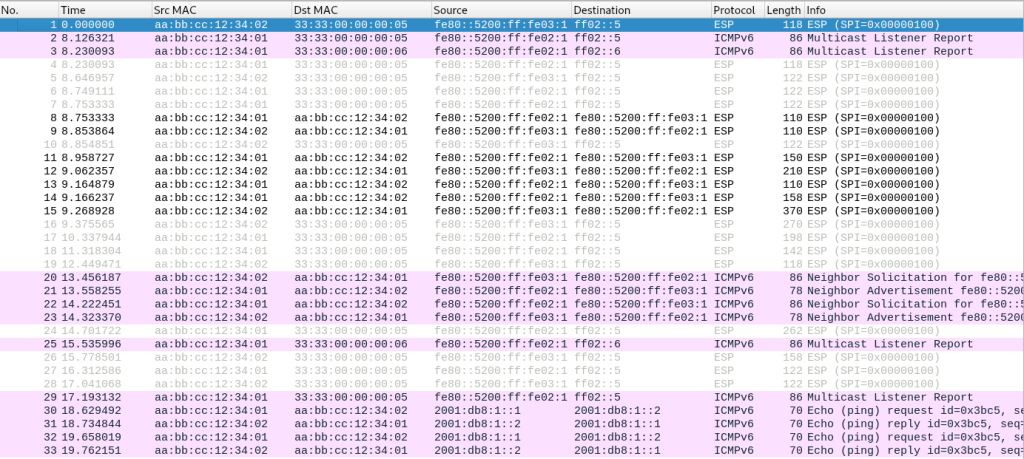
Security Association Using ESP
Finally, using ESP, we can see the OSPF traffic is encrypted. The ping traffic is still in clear text, showing that only the OSPFv3 traffic is being encrypted.
What If One Side Is Not Using Authentication
In this example, the ospfv3 interface reference to the security association was removed on R2.
lab@vRouter-2> show configuration protocols ospf3
area 0.0.0.0 {
    interface ge-0/0/0.0;
    interface lo0.0;
}
reference-bandwidth 100g;

lab@vRouter-2>
This generated the following logs.
R1:
lab@vRouter-1> show log messages | last 10
..
<<removed for brevity>>
...
Nov  3 03:29:16  vRouter-1 kernel: ipsec_is_inbound_pkt_valid(2166): Packets are sent in clear to a socket with ipsec enabled; src=fe80::5200:ff:fe03:1, dst=ff02::5, ifl=326, rtbl_idx = 0
Nov  3 03:29:43  vRouter-1 last message repeated 3 times
Nov  3 03:29:58  vRouter-1 last message repeated 2 times

lab@vRouter-1>
R2:
lab@vRouter-2> show log messages | last 10
..
<<removed for brevity>>
...
Nov  3 03:29:24  vRouter-2 kernel: ipsec_is_inbound_pkt_valid(2201): Socket option not set with the addr=fe80::5200:ff:fe02:1, ifl=341, rtbl_idx=0, so=0xfffff80079f86370
Nov  3 03:29:51  vRouter-2 last message repeated 3 times
Nov  3 03:30:01  vRouter-2 kernel: ipsec_is_inbound_pkt_valid(2201): Socket option not set with the addr=fe80::5200:ff:fe02:1, ifl=341, rtbl_idx=0, so=0xfffff80079f86370
Nov  3 03:30:24  vRouter-2 last message repeated 3 times
Nov  3 03:32:25  vRouter-2 last message repeated 14 times

lab@vRouter-2>